
Thermal Paste On Pins can look like a minor spill, but it deserves careful attention. A thin gray streak across a processor’s contact area may interfere with a connection, even when the paste is not electrically conductive. The risk depends on where the paste landed, how much is present, and what the product contains. “China Top” in a product title does not confirm its ingredients or electrical properties. Check the label and manufacturer’s technical information before making assumptions.
The hardware matters, too. Some processors have exposed pins, while others fit into sockets with delicate contacts. A paste coating can be difficult to remove and may leave residue between tiny gaps. Conductive compounds, including some metal-based products, can create a greater short-circuit risk. Nonconductive paste is not automatically harmless; it can still obstruct contact. That matters.
This guide explains how to assess the situation without rushing into a repair. It covers what to inspect, which product details to verify, and when professional help is the safer choice. Avoid scraping pins or applying solvents without checking the component maker’s guidance. A close, well-lit photo can help identify the affected area, but it cannot prove the paste is gone. I would not treat a clean-looking surface as certainty. A cautious inspection is less satisfying than a quick fix, but it can prevent a small spill from becoming damaged hardware.
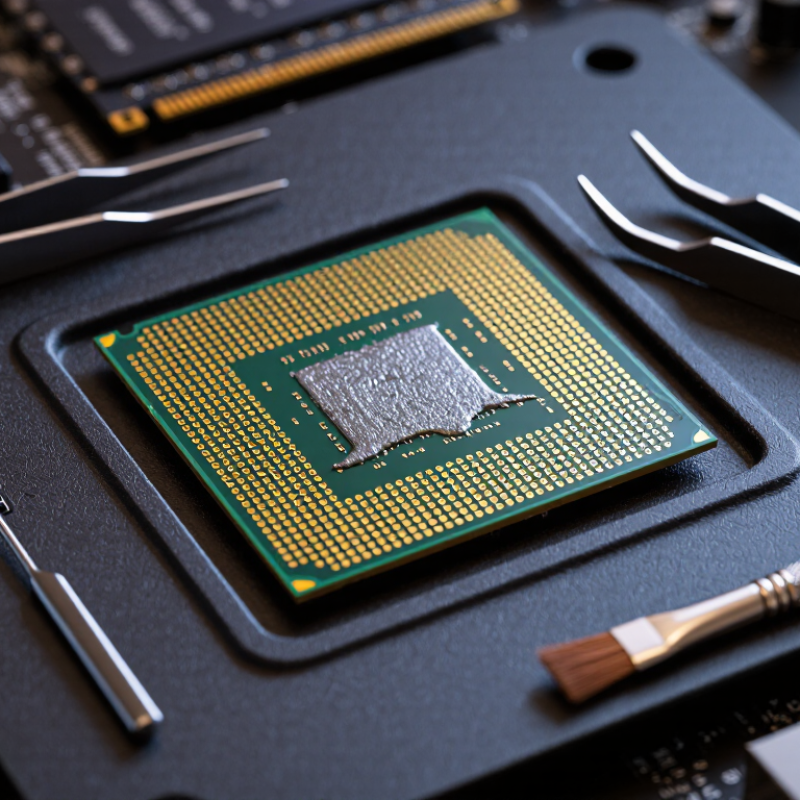
Thermal paste is a soft, heat-conducting compound placed between a processor’s metal surface and its cooler. It fills tiny gaps that trap air and slow heat transfer. Only a thin layer is needed. Too much can squeeze outward when the cooler is pressed down.
Paste should not normally touch processor pins. It may reach them when someone applies a large blob, spreads it near the edge, or tilts the cooler during installation. A smear can also transfer from a tool or fingertip. On some systems, the pins are on the socket rather than the processor, so check the hardware design before handling anything. It is easy to assume all paste behaves alike, but some formulas can conduct electricity while others are designed not to. Read the product’s technical information rather than guessing.
Power off and unplug the system before inspecting it. Use bright light and magnification to look for residue between pins. Don’t scrape or bend them; even a small tool can cause damage. If paste is present, follow the processor or motherboard maker’s cleaning guidance, and seek qualified repair help if the pins are bent or difficult to reach. A careful inspection takes time. I’d still avoid calling any paste “safe” on pins, because the result depends on its composition and where it has spread.
| Topic | What It Means | Safety and Practical Guidance |
|---|---|---|
| What thermal paste is | Thermal paste is a heat-transfer compound applied in a thin layer between a processor’s heat spreader and a cooler. It fills microscopic gaps that would otherwise trap air. | Apply it to the processor’s intended contact surface, not to pins, socket contacts, or other electrical connections. |
| How it can reach processor pins | Paste may spread from an oversized application, be pushed outward when the cooler is mounted, or transfer from a tool or finger during handling. Paste can also be smeared onto contacts while installing or removing a processor. | Use a modest amount and lower the cooler evenly. Avoid touching the underside of the processor or the motherboard socket. |
| Conventional nonconductive paste | Many common pastes use silicone-based material with ceramic or other electrically insulating fillers. Their exact composition varies. | “Nonconductive” does not mean harmless to contacts: residue can interfere with reliable electrical contact or make cleaning difficult. Check the product’s safety and application instructions. |
| Electrically conductive compounds | Some thermal compounds contain electrically conductive metal particles. Liquid-metal products commonly use gallium alloys and conduct electricity. | Keep conductive compounds away from pins, socket contacts, circuit traces, and other exposed electronics. A spill can cause an electrical short when the system is powered. |
| Processor pins and socket contacts | Some processors have pins on the processor package; other designs place delicate contacts in the motherboard socket. Both types of contact can be damaged or obstructed by contamination. | Identify the contact location before handling the processor. Do not bend pins or press debris deeper into a socket. |
| If paste gets on contacts | Contamination may prevent a dependable connection and can lead to failed startup, memory or device detection issues, or intermittent operation. The result depends on the compound and where it lands. | Turn the computer off, unplug it, and do not power it on until the area is clean and fully dry. If contamination is inside a delicate socket, consider professional repair. |
| Cleaning guidance | For accessible, sturdy surfaces, high-purity isopropyl alcohol and a lint-free material are commonly used for removing thermal compound. | Use minimal liquid, avoid force and abrasive tools, and let the area dry completely. Do not flood a socket or scrub delicate contacts; follow the processor and compound manufacturers’ instructions. |
| Liquid-metal compatibility | Gallium-based liquid metal can react with aluminum and may damage aluminum heat sinks. It is electrically conductive and can spread easily. | Do not use it on aluminum surfaces or near exposed electrical contacts. Use only where the cooler and processor materials are explicitly compatible. |
| Prevention checklist | Clean the processor’s heat-spreader surface, keep the paste container and applicator away from contacts, and use only the amount recommended for the application. | Mount the cooler carefully, inspect for overflow before powering on, and consult a qualified technician if pins or socket contacts are bent or contaminated. |