three part picture of forklifts

Why Choose a Fingerprint Smart Lock for Your Business?

A busy office often starts with small access decisions: who can enter the stockroom, when a contractor’s access should end, and what happens when a key goes missing. A Fingerprint smart lock can make routine entry quicker by allowing approved users to unlock a door with a registered fingerprint. Staff do not need to carry another key or remember a separate code. No shared keys. For managers, user permissions and access records may also make day-to-day access easier to oversee, depending on the lock’s features.

Convenience is only part of the decision. Fingerprint readers can struggle with wet, dusty, or worn fingers, and performance varies by model, installation, and maintenance. A biometric reader is not a complete security plan. Businesses should consider door strength, emergency access, power backup, and how the lock stores and protects fingerprint data. Check whether permissions can be changed promptly when staff roles change, and confirm that the system works with the door and access process already in place. Ask the supplier about support, updates, and what happens during a power or network outage. Small details matter. A carefully selected lock can support a smoother entry routine, but it will not solve every access problem. Compare real operating needs with the product’s documented capabilities, and leave room to revise the setup after staff use it.
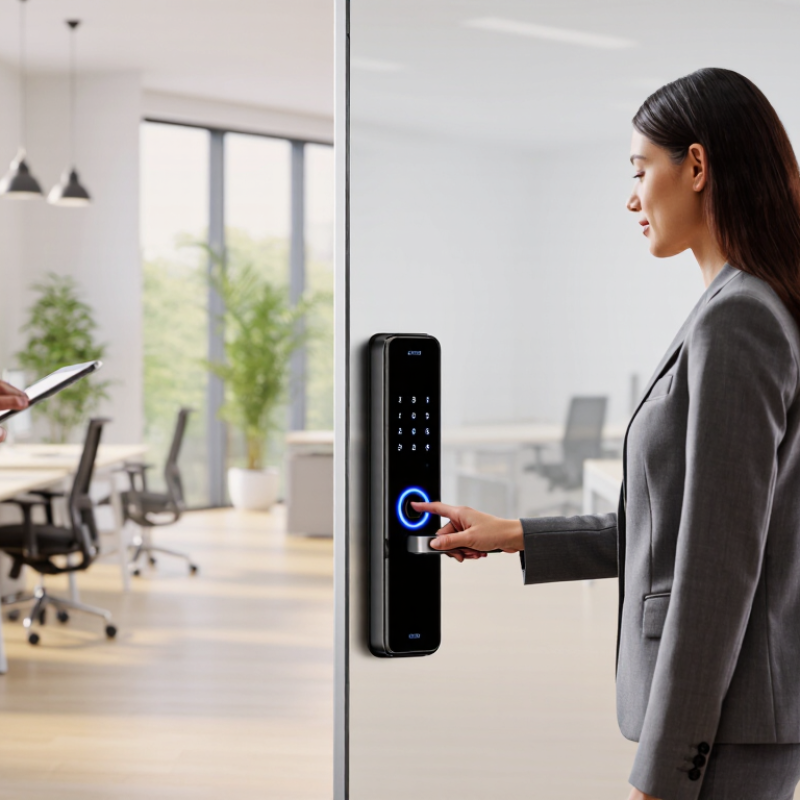
Why Choose a Fingerprint Smart Lock for Your Business?

What Is a Fingerprint Smart Lock?

A fingerprint smart lock is an electromechanical lock that checks a person’s fingerprint before releasing its bolt or latch. A sensor captures ridge details and compares them with an enrolled biometric template. Depending on the model, templates and access records may be stored locally or managed through connected software. Do not assume every lock handles data the same way. Check its storage, backup-entry options, and audit-log controls before installation.

For a business, the practical change is simple: staff can unlock a door with a finger instead of carrying or sharing a metal key. NIST’s Digital Identity Guidelines, SP 800-63B, say biometrics should be used with a physical authenticator and are not secret by themselves. A fingerprint reader is therefore one part of an access system, not a complete security plan. Keep a controlled backup method, and remove access promptly when someone leaves.

There is a human factor. Verizon’s 2024 Data Breach Investigations Report found that 68% of breaches involved a non-malicious human element. That figure does not measure smart locks, but it shows why reducing routine credential handling can matter. It cannot prevent every mistake. A wet finger, worn sensor, or power outage may also interrupt entry, so test those scenarios at the actual door. Small detail. A lock that works reliably at reception may struggle near a loading bay.

Why Choose a Fingerprint Smart Lock for Your Business?

What is a fingerprint smart lock? It is an electronic lock that uses a fingerprint as an access credential. This chart compares the primary credential needed at the door—not every feature or backup option a lock may offer.

How to read it: A key-based lock needs a physical key, while a PIN lock needs a code. Fingerprint entry uses a registered biometric instead of a separate item or code. Backup access methods vary by model.

How Does Fingerprint Authentication Work?

At a business entrance, fingerprint authentication starts when a reader scans the ridges and valleys of a finger. Software converts distinctive points, such as ridge endings and splits, into a digital template. During later checks, the reader compares a fresh scan with the enrolled template and grants access if the match meets its threshold. A quick touch. Many systems store templates rather than ordinary fingerprint images, but storage and encryption practices vary. Ask how templates are protected, who can manage access, and what happens if the reader fails.

The National Institute of Standards and Technology’s Digital Identity Guidelines (SP 800-63B, Revision 3) set a benchmark: biometric systems should achieve a false match rate of 1 in 1,000 or better. That figure is a testing target, not a promise that every door will perform identically. Wet fingers, worn fingerprints, dust, and poor reader placement can affect scans. Keep a keypad, access card, or staffed fallback available, and review access logs regularly. No sensor is magic. A thoughtful setup also limits who can enroll or remove fingerprints, since convenience can otherwise make access control harder to audit.

How Can It Improve Business Security and Access Control?

An employee’s badge can be borrowed, misplaced, or left active after a role change. A fingerprint smart lock links entry to an enrolled user and logs each unlock. Managers can review who entered a stockroom, office, or server room, and when. The 2024 Data Breach Investigations Report found that 68% of breaches involved a human element, such as error or social engineering. That figure is not about door locks specifically. It does show why reliable identity checks matter.

For daily access control, assign permissions by role and remove them promptly when duties change. A fingerprint reader can reduce dependence on shared PINs, while entry logs help investigate an unexpected late-night visit. Useful, but not infallible. Wet, injured, or aging fingers may fail to scan, so provide a secure fallback and a clear process for visitors. NIST digital identity guidance treats biometrics as one factor, not a standalone secret. The 2024 Cost of a Data Breach Report estimated the average breach cost at $4.88 million; it does not isolate physical access failures, but it underscores the value of layered safeguards. A lock also needs careful enrollment, regular permission reviews, and tested backup access. That work is easy to overlook.

What Operational Benefits Does It Offer Businesses?

A fingerprint smart lock can reduce routine access work at a busy office, clinic, or stockroom. Staff no longer need to carry a shared key or remember a changing door code. Fewer handoffs. When an employee leaves, an administrator can remove that person’s access instead of collecting every key. The change is useful, though it does not replace a clear access policy.

For daily operations, access records can help managers check who entered a secured room and when. This can make it easier to investigate a misplaced tool or a delivery left inside. Reception teams may also spend less time answering lockout requests, especially when authorized staff can use a registered finger. That matters. A fingerprint reader still needs sensible setup: enroll users carefully, test the door after installation, and keep a backup entry method available.

There are trade-offs. Wet, dusty, or worn fingers may not scan reliably, and a power or hardware problem can interrupt access. Businesses should check the lock’s operating conditions, battery alerts, record controls, and emergency procedures before choosing a model. Enrollment can also take longer than expected when staff turnover is high. A modest trial on one frequently used door can reveal these practical issues before the system is expanded.

What Should Businesses Consider Before Choosing One?

Before choosing a fingerprint smart lock, estimate how many people need access and how often permissions change. A small office may need simple staff enrollment, while a busy clinic may require detailed access records. Check whether the lock fits your door, power supply, and network setup. Dust, moisture, gloves, or worn fingerprints can affect scanning. Test it in the actual location, not just in a showroom.

Review what happens when power or connectivity fails. Ask how administrators add or remove users, and whether access records can be exported securely. Fingerprint data should be protected, and the supplier should explain how it is stored and deleted. Keep a practical backup method, such as a managed key or keypad, for emergencies. No system is perfect. Staff may also need time to learn the scanner, especially during a rushed shift.

Tips: Try enrollment with several employees, including people with different finger conditions. Check scan speed, failed-read handling, battery alerts, and backup access. Write down who can manage permissions. One detail is easy to overlook: make sure your routine for removing former staff works smoothly.

Why Choose a Fingerprint Smart Lock for Your Business? — What Should Businesses Consider Before Choosing One?

Consideration What to Evaluate Practical Decision Check Why It Matters
Access needs Which doors need controlled access, who needs entry, and whether access should vary by role or schedule. Map users, doors, operating hours, and any required time-based permissions before comparing models. A fingerprint lock can make entry convenient, but the access plan determines whether it fits the business.
Fingerprint performance How the reader performs with the expected users and conditions, including occasional false rejections or failed reads. Request performance-test information, such as results assessed under ISO/IEC 19795 methods, and arrange an on-site trial where possible. Biometric performance depends on the device, test conditions, and users; there is no single performance figure that applies to every lock.
Alternative entry methods Whether the lock supports a key, PIN, credential, remote release, or another backup method. Confirm how authorized users can enter if a fingerprint cannot be read, a user is not enrolled, or the device is unavailable. Backup options help prevent entry problems from disrupting normal business operations.
User and event management Maximum fingerprint capacity, administrator controls, user removal, access schedules, and event-log features. Check the exact model’s documented user capacity and log-retention limits; these vary by product. Businesses need to manage staff changes and review access activity without assuming that all models offer the same controls.
Door and hardware compatibility Door material, thickness, handing, lock type, existing hardware, and any wiring or network requirements. Compare the manufacturer’s installation requirements with the actual door and have a qualified installer assess uncertain cases. A smart lock may not fit every door or work with every existing access-control setup.
Power and emergency operation Power source, low-battery alerts, emergency power options, and lock behavior during power loss. Read the product documentation and confirm the proposed configuration meets applicable building and fire-safety requirements. Power-loss behavior and emergency egress requirements depend on the lock design and local rules.
Weather and environment Exposure to rain, dust, temperature changes, cleaning products, and heavy daily use. For exposed installations, check the device’s stated environmental protection rating. IP ratings are defined by IEC 60529; confirm the rating applies to the intended installation. A lock intended for indoor use may not be suitable for an exposed entrance.
Privacy and data handling Where fingerprint data is stored, how it is protected, who can access it, and how it is deleted. Review the vendor’s data-processing documentation and applicable privacy laws in the locations where the business operates. Biometric data is sensitive, and legal obligations vary by jurisdiction and implementation.
Connectivity and cybersecurity Whether the lock works offline, uses a network connection, receives software updates, and supports administrator security controls. Ask what functions depend on an app, cloud service, or internet connection, and how updates and administrator accounts are managed. Understanding dependencies helps businesses assess service continuity and protect connected access systems.
Total cost and support Purchase and installation costs, subscriptions, replacement parts, warranty coverage, and support availability. Compare the full expected cost over the planned service period, not only the initial device price. Ongoing fees, maintenance, and replacement needs can affect the overall value of the system.

Article Source: